

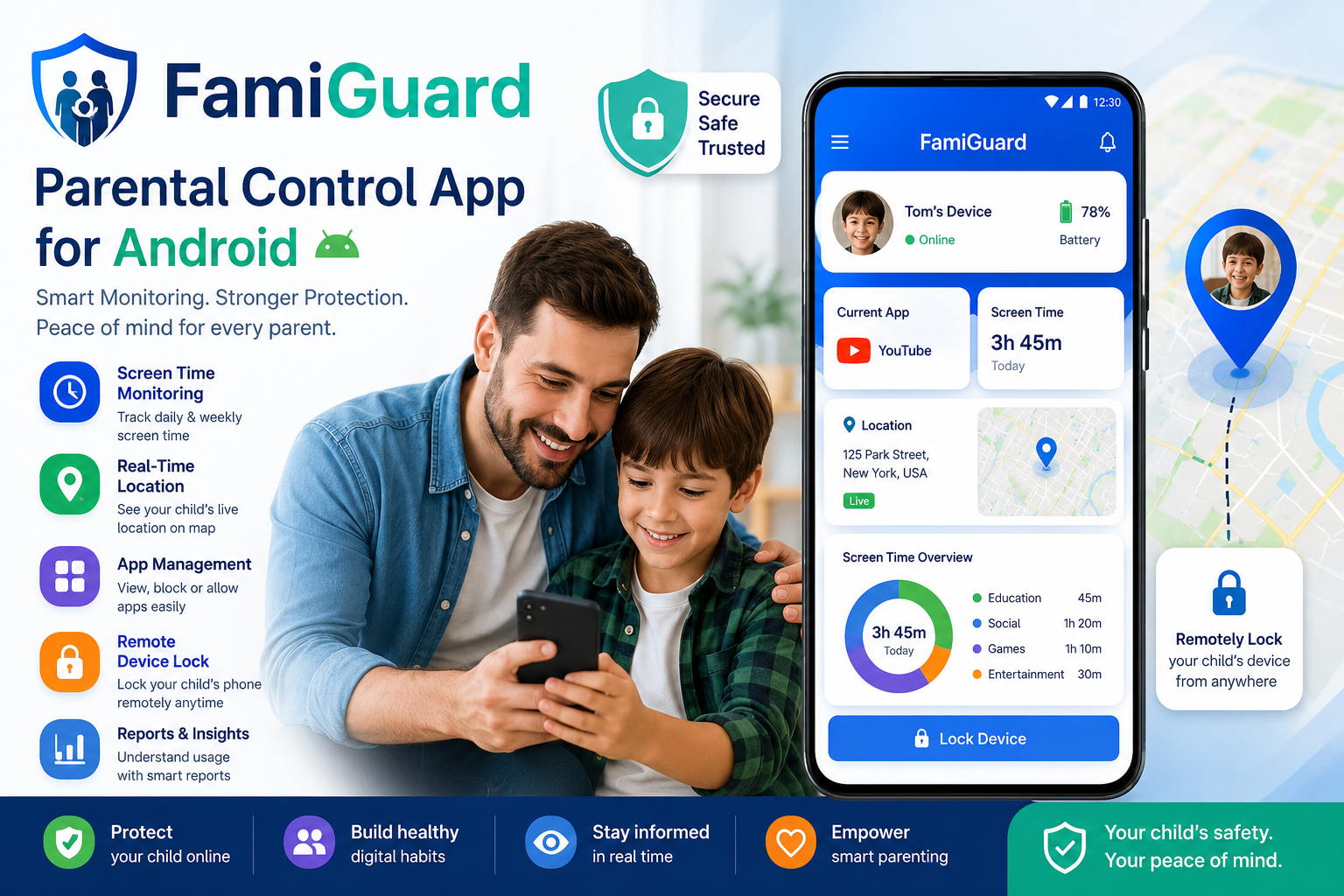
In today’s digital world, children are using smartphones for learning, entertainment communication, and daily activities. While technology can be helpful, parents also need the right tools to guide healthy screen habits, protect kids online and stay informed about device usage. This is where FamiGuard a powerful parental control app for Android becomes useful for modern families.
FamiGuard is designed to help parents monitor their child’s smartphone activity, track real-time location, manage installed apps, review screen time reports, and remotely lock the device when needed. Instead of giving parents complicated controls, the app provides a clean and simple dashboard where important safety information is easy to understand.
The goal of FamiGuard is not to invade privacy, but to support responsible digital parenting. It gives parents the tools they need to create safer phone habits, reduce distractions and help children use technology in a balanced way.
What Is FamiGuard?
FamiGuard is an Android parental control and monitoring app built for families who want better visibility into their child’s digital activity. The app allows parents to connect child devices securely and monitor key information from their own phone.
With FamiGuard, parents can view daily screen time check battery status see the current app being used, monitor location, manage installed apps and lock the child’s phone remotely. These features make it easier for parents to support online safety, study time bedtime routines, and balanced device usage.
The app is especially useful for parents who want a simple practical, and privacy focused child monitoring solution without unnecessary complexity. Download Now
Key Features of FamiGuard
Parent or Child Setup
FamiGuard starts with a simple role-based setup. When users open the app, they can choose whether the device belongs to a parent or a child. Parents can securely link multiple child devices to their account making it easier to manage more than one child from a single dashboard.
This setup keeps the experience organized and helps ensure that parental control features are activated with clear consent and proper configuration.
Smart Home Dashboard
The home dashboard gives parents a quick overview of their child’s device activity. From one screen, parents can see important details such as battery status, current app usage, live location, and total screen time for the day.
This makes FamiGuard helpful for busy parents who want fast updates without checking multiple menus. The dashboard is designed to provide real-time insights so parents can make better decisions about device usage.
Remote Device Lock
One of the most useful features of FamiGuard is remote device locking. Parents can lock their child’s phone directly from their own device when it is time for homework, family time, meals, or bedtime.
This feature helps reduce distractions and supports healthier routines. Instead of repeatedly asking a child to stop using the phone, parents can set clear boundaries and enforce them when needed.
Manage Installed Apps
FamiGuard allows parents to search, filter and view apps installed on the child’s device. Parents can monitor app usage and choose which apps should be allowed or restricted.
This is helpful when children spend too much time on games, social apps, or entertainment platforms. Parents can guide app usage in a balanced way and help children focus on learning, rest, and productive activities.
AccessibilityService API Usage
FamiGuard uses the AccessibilityService API only for core parental control features. This helps the app detect app usage block or restrict selected apps enforce screen time limits and lock the child’s device during study or rest periods.
The AccessibilityService permission is activated manually and requires user consent during setup. FamiGuard does not use this permission for call recording, hidden data extraction, audio recording, deceptive actions or unauthorized system changes.
All accessibility-related permissions are clearly explained inside the app setup process so users understand why the permission is needed and how it supports parental control features. Explore More Apps
Why Parents May Need a Parental Control App for Android
Children today often use phones for school, games, videos messaging and social media. Without guidance it can become difficult to manage screen time or know whether a child is using the phone responsibly.
A parental control app for Android like FamiGuard helps parents create a safer and more balanced digital environment. It gives parents tools to supervise phone usage without needing to constantly check the child’s device manually.
FamiGuard can help with:
- Reducing excessive screen time
- Managing distracting apps
- Supporting homework and bedtime routines
- Improving family digital habits
- Tracking child location for safety
- Understanding app usage patterns
- Encouraging responsible technology use
Who Should Use FamiGuard?
FamiGuard is suitable for parents who want to protect their children online and manage smartphone usage more effectively. It can be useful for families with school-age children, teenagers, or kids who are just starting to use Android devices.
The app is also helpful for parents who want a simple solution instead of a complicated technical setup. With its parent child connection system and easy dashboard, FamiGuard makes digital supervision more accessible.
FamiGuard App Details
FamiGuard is available for Android devices and supports Android 6.0 and above. The app version is 1.8 and was updated on February 13, 2026. It has a download size of around 12 MB and has received 5,000+ downloads.
The app is rated for users aged 3+ and includes interactive elements such as location sharing. It is offered by Speckpro Digital and is designed to help parents manage child device usage in a secure and transparent way.
Benefits of Using FamiGuard
FamiGuard provides multiple benefits for modern parents. It combines monitoring, app management, location tracking, reporting, and device locking into one simple parental control solution.
The biggest benefit is peace of mind. Parents can stay informed about their child’s digital activity without needing to guess what is happening on the device.
Another benefit is better routine control. With remote locking and app management parents can help children focus during study time, rest during bedtime and spend less time on distracting apps.
FamiGuard also supports better communication between parents and children. When used responsibly, the app can help families discuss screen time, online safety, and healthy technology habits.
Privacy-Focused Parental Control
A good parental control app should protect children without misusing personal data. FamiGuard includes secure login encrypted data protection clear permission disclosure, and a delete all data option.
This makes the app more transparent and family-friendly. Parents stay in control, and the app clearly explains why permissions are needed.
FamiGuard is built for responsible parenting, not hidden surveillance. Its purpose is to help families create safer digital habits while respecting privacy and trust.
Final Thoughts
FamiGuard is a practical and easy-to-use parental control app for Android that helps parents monitor screen time, manage apps, track location, and lock child devices remotely. It brings important family safety tools into one simple app and gives parents better control over their child’s digital environment.
For parents who want peace of mind, healthier screen habits and better online safety for their children FamiGuard is a strong option to consider.
Download FamiGuard today and take a smarter step toward safe, balanced and responsible digital parenting.